How to Order Eyeglasses from Lenstick – Complete Step-by-Step Guide

If you are visiting Lenstick for the first time, you might feel a little confused about how to place an order.
Don’t worry — this simple guide will show you the exact steps with clear screenshots, so you can order your favourite eyeglasses without any hassle.
1. Start From the Homepage
When you open www.lenstick.com, you will see the homepage with categories like Women’s, Men’s, Kids, and many new arrivals.
From here, tap on Shop or scroll down to explore different eyewear sections.
2. Select Your Category
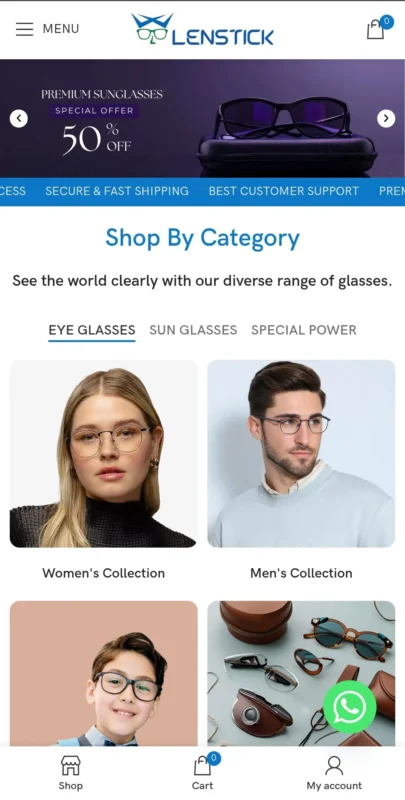
Inside the Eyeglasses section, you will find options such as:
- Women’s Collection
- Men’s Collection
- Kids Collection
Tap on the category that matches what you’re looking for.
3. Browse the Frames
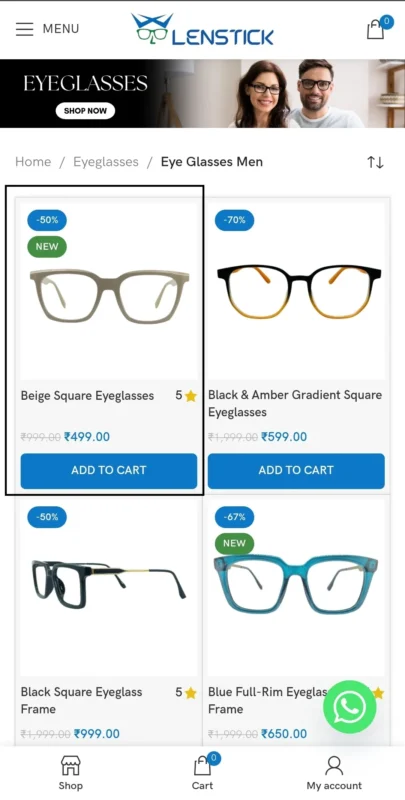
You will now see a clean grid of frames with prices, discounts, and an “Add to Cart” button.
Click on the frame you like to open the detailed product page.
4. Open the Frame Details Page
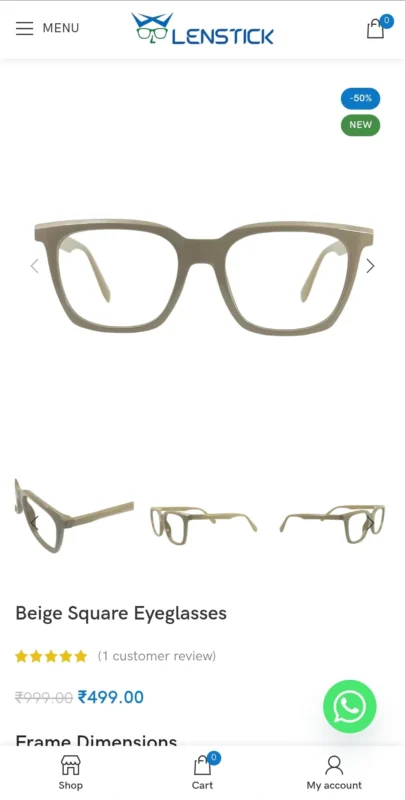
This page shows you:
- High-quality images from different angles
- Price
- Ratings
- Frame dimensions (Lens width, Bridge width, Temple length, Lens height)
This helps you understand how the frame looks and fits.
5. Choose “Frame Only” or “Buy With Lenses”
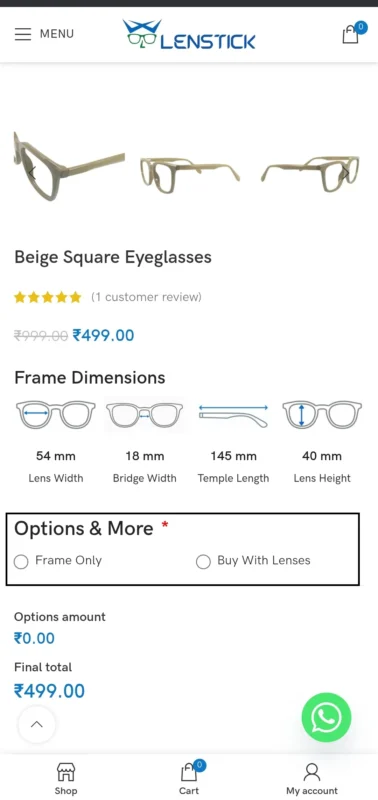
Scroll down and you will see two options:
- Frame Only
- Buy With Lenses
If you only want the frame, select Frame Only.
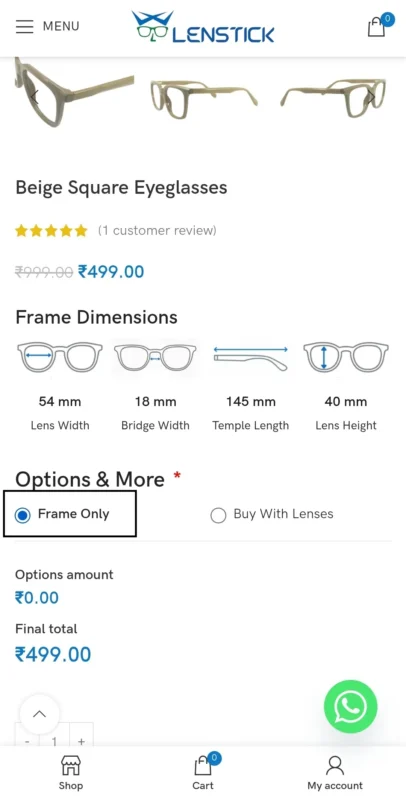
If you want complete glasses, select Buy With Lenses.

6. Select Your Vision Type
If you choose “Buy With Lenses”, the next section will show you:
- Zero Power
- Single Vision
- Progressive
- Photochromic
Tap on the option you need.
7. Select Lens Type
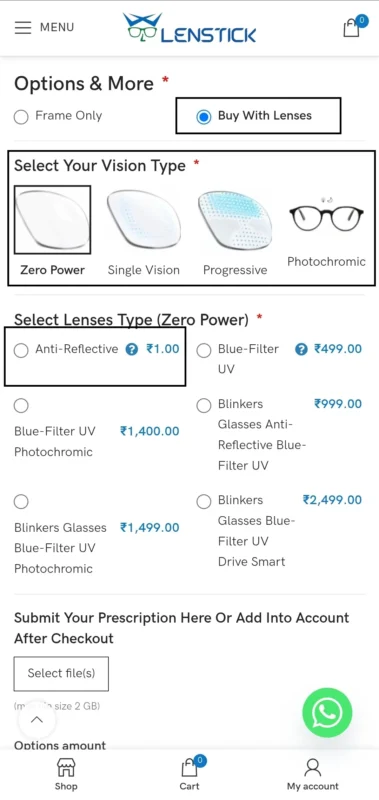
You will now see all available lens types with their prices.
Example lens options include:
- Anti-Reflective
- Blue-Filter UV
- Blue-Filter + Photochromic
- Drive Smart Lenses
Choose the lens that fits your requirement.
8. Upload Your Prescription (Optional)
Below the lens options, you will see a box saying:
“Submit Your Prescription Here”
You can upload your prescription photo from your phone.
If you don’t have it right now, you can also share it later after checkout.
9. Check the Final Price
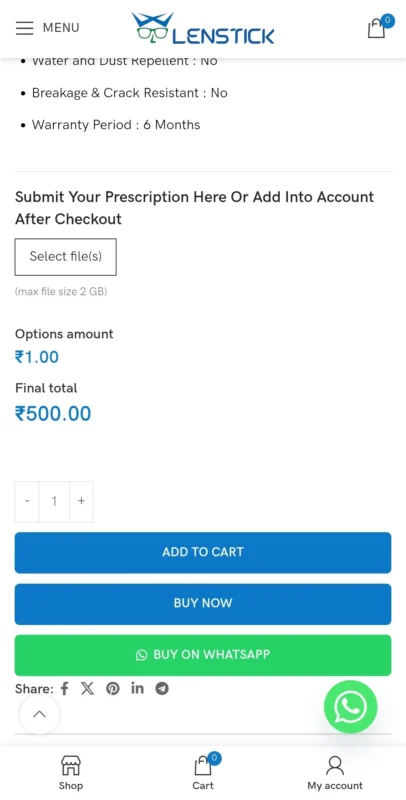
The page shows your final total based on the frame + selected lenses.
Once everything looks good, tap on Add to Cart or Buy Now.
10. Go to Cart and Proceed to Checkout
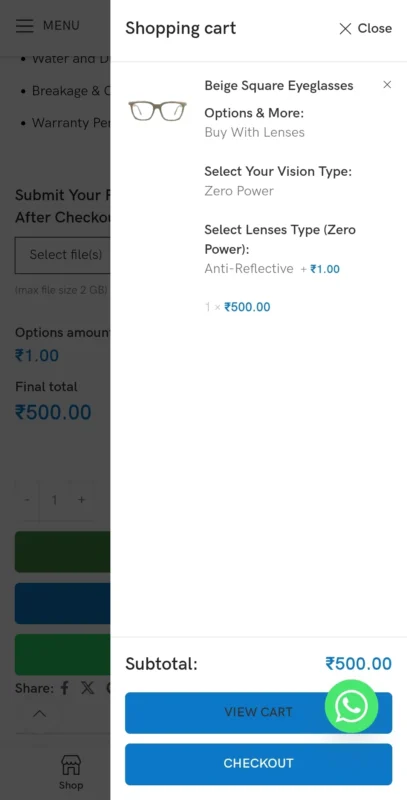
Open the cart icon at the bottom and check your selected items.
Click Proceed to Checkout.
11. Fill Your Billing Details
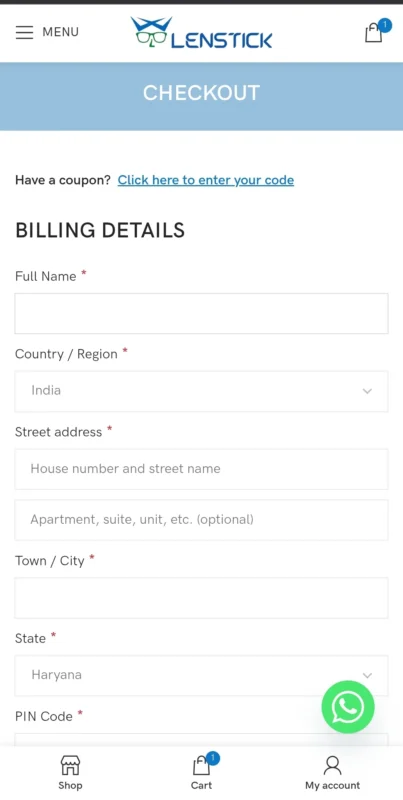
In the checkout form, enter:
- Full Name
- Address
- Town / City
- State
- PIN Code
- Phone Number
- Email Address
Make sure your details are correct for a smooth delivery.
12. Choose Your Payment Method
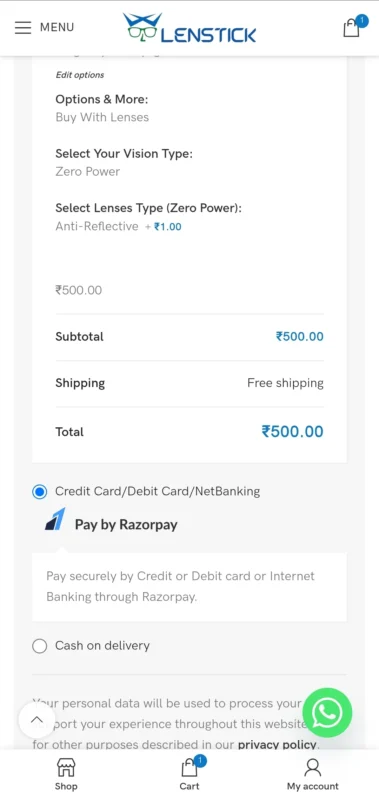
Lenstick offers safe and secure payment options:
- Credit/Debit Card
- Net Banking
- UPI
- Cash On Delivery
Select the method and complete the payment.
13. Order Confirmation
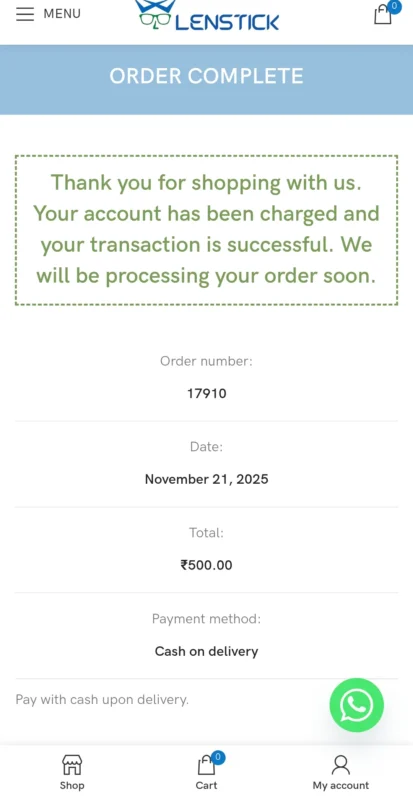
After successful payment, you instantly receive an:
- Order Confirmation Email
- SMS/WhatsApp update
- Order ID
This confirms your order has been successfully placed.
14. Shipping & Tracking

Within 24–48 hours, your order is shipped.
You will receive a tracking link from the courier company on WhatsApp or SMS.
Click the link anytime to check:
- Order in transit
- Out for delivery
- Delivered status
15. Receive Your Eyewear
Your package arrives with:
- Premium frame
- Microfiber cloth
- Hard case
- Warranty details
Now enjoy your new Lenstick eyewear!
Final Words
Ordering from Lenstick is simple, safe, and quick.
This guide covers every step — from selecting a frame to choosing lenses and completing the checkout — so you never feel confused again.
If you still need help while ordering, feel free to contact our support team.
💬 WhatsApp Support: +91 8755491511
📩 Instagram: @lenstickeyewear
FAQ Section
1. How do I place an order on Lenstick?
Simply choose your frame, select “Frame Only” or “Buy With Lenses,” pick your lens type, add to cart, fill your details at checkout, and make the payment.
2. Can I buy only the frame without lenses?
Yes! Lenstick allows you to purchase Frame Only. Just select the “Frame Only” option on the product page before adding to cart.
3. How do I upload my prescription?
On the product page, you’ll find an option to Upload Your Prescription. You can upload it during ordering or send it later via WhatsApp after checkout.
4. What lens options are available?
Lenstick offers Zero Power, Single Vision, Progressive, and Photochromic lenses with multiple coatings like Anti-Reflective and Blue-Filter UV.
5. Do I get order confirmation after payment?
Yes. After payment, you instantly receive an order confirmation email and WhatsApp message with your order ID.
6. How can I track my order?
Once your order is shipped (usually within 24–48 hours), you receive a tracking link on SMS/WhatsApp to check live delivery updates.
7. How long does delivery take?
Delivery usually takes 3–7 days, depending on your location. Metro cities get faster delivery.
8. Can I change my prescription after placing the order?
Yes, you can update your prescription by contacting Lenstick support immediately after placing your order.
9. What if I need help while ordering?
Lenstick support is always available through WhatsApp and Instagram DM. You can ask about lenses, power, tracking, or anything else.